
Provide Google Workspace User Admin Role
This article explains how to assign an Admin role to a user in Google Workspace (GWS).
Summary
This article explains how to assign an Admin role to a user in Google Workspace (GWS).
Applies To
Google Workspace (GWS), Admin Console
Symptoms
User does not have required admin privileges to manage users or services.
Cause
The user account has not been granted the necessary Admin role in Google Workspace.
Resolution
Sign in to the Google Admin Console (admin.google.com):
Go to Directory → Users.
Summary
This article explains how to assign an Admin role to a user in Google Workspace (GWS).
Applies To
Google Workspace (GWS), Admin Console
Symptoms
User does not have required admin privileges to manage users or services.
Cause
The user account has not been granted the necessary Admin role in Google Workspace.
Resolution
Sign in to the Google Admin Console (admin.google.com):
Go to Directory → Users.

Click the user you want to make an admin
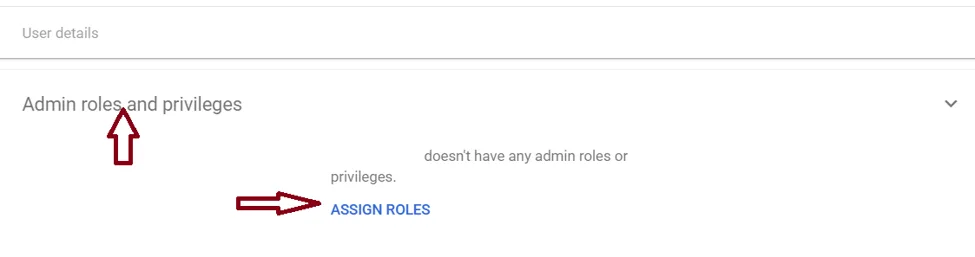
Scroll down and select Admin roles and privileges.
Then ASSIGN ROLES.
In Roles select Super admin and toggle button to assign Super admin role.
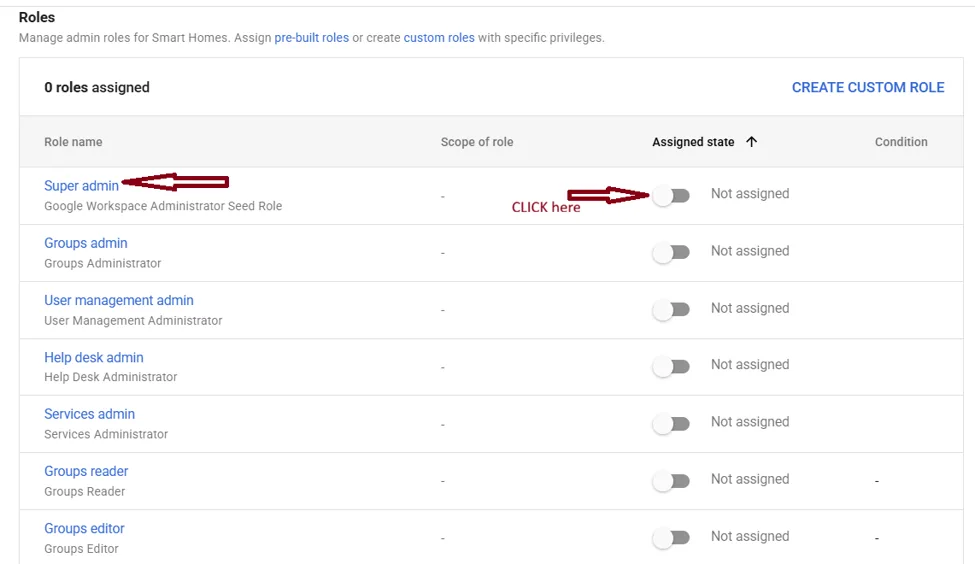
Then click save.
Verification
Ask the user to log out and log back in, then verify access to Admin functions.
Troubleshooting
Ensure you have sufficient permissions to assign roles.
Check if the role assignment is saved.