
How to Add a Secondary Domain in Google Workspace
Summary
This article explains how to add and verify a secondary domain in Google Workspace.
Applies To
Google Workspace Admin Console
Resolution
Log in to the Google Admin Console using an administrator account.
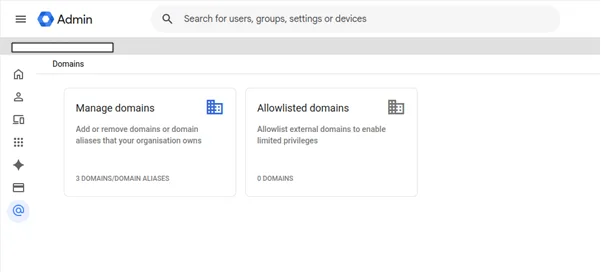
Go to Account → Domains → Manage domains.
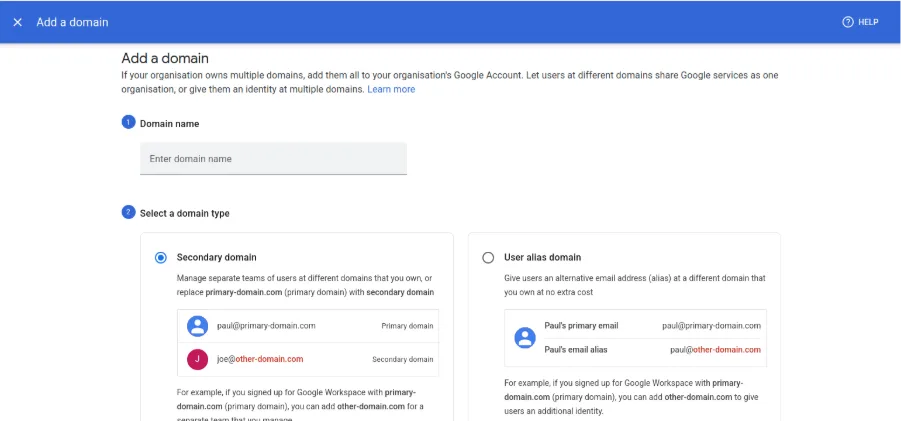
Click Add a domain.
Enter the domain name and select Secondary domain.
Click Add and start verification.
Copy the TXT verification record provided by Google and add it to the domain's DNS zone(i.e Nameservers).
Return to the Admin Console and click Verify after the records have been propagated.
Once the domain is verified, click Activate Gmail if email services are required.
Configure the required MX records in the domain's DNS.
Create the required users under the newly added secondary domain.
Verification
Confirm that the secondary domain shows as Active in the Admin Console.
Troubleshooting
If verification fails, verify that the TXT record has been added correctly.