
How to Remove a WordPress Website from Plesk
This article explains how to uninstall a WordPress website from the Plesk control panel using the WordPress Toolkit.
Applies To
Plesk Obsidian / Onyx
WordPress installations managed via WordPress Toolkit
Symptoms
Administrators may need to:
Remove unused WordPress websites.
Free up server resources.
Clean up staging or demo environments.
Resolution
Log in to your Plesk control panel.
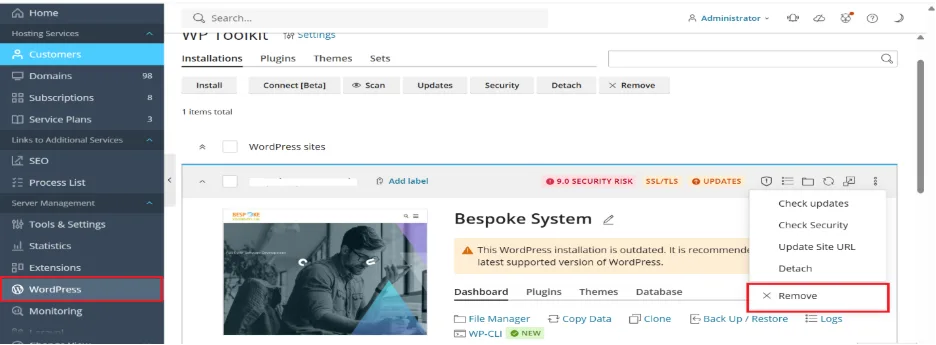
Navigate to Server Management → WordPress.
Select the website you want to remove.
Click on the three dots (⋮) on the right side of the installation.
Click Remove.
This will delete WordPress files and the associated database.
Verification
Confirm the WordPress installation no longer appears in the WordPress Toolkit.
Ensure the domain no longer loads the WordPress site.
Check that the database has been removed from Plesk.
Troubleshooting
If WordPress still appears in Toolkit: Run a Scan in WordPress Toolkit to refresh the list.
If files remain: Manually check the domain’s root folder (/httpdocs) for leftover themes/plugins.
If database errors occur: Verify that the correct database was deleted.
If you only want to detach (not delete): Use the Detach option in WordPress Toolkit to stop managing the site without removing it.