
503 Error on a Website Hosted on Plesk Panel
This article provides a detailed guide to identify and resolve the '503 Service Unavailable' error on websites hosted in the Plesk control panel. The issue typically indicates that the server is temporarily unable to handle requests.
Summary
This article provides a detailed guide to identify and resolve the '503 Service Unavailable' error on websites hosted in the Plesk control panel. The issue typically indicates that the server is temporarily unable to handle requests.
Applies To
Plesk Panel
Plesk for Windows
Symptoms
Website displays '503 Service Unavailable' error
Site becomes temporarily inaccessible
Cause
- Resource limits exceeded (CPU, RAM, or connections)
Resolution
Log in to your Plesk control panel.
Navigate to Websites & Domains.
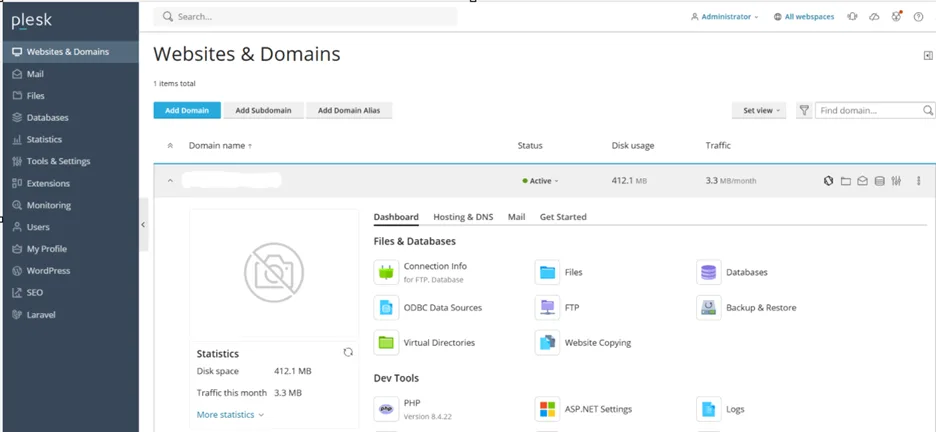
Select the affected domain.
Go to the Hosting & DNS tab.
Click on Dedicated IIS Application pool for website
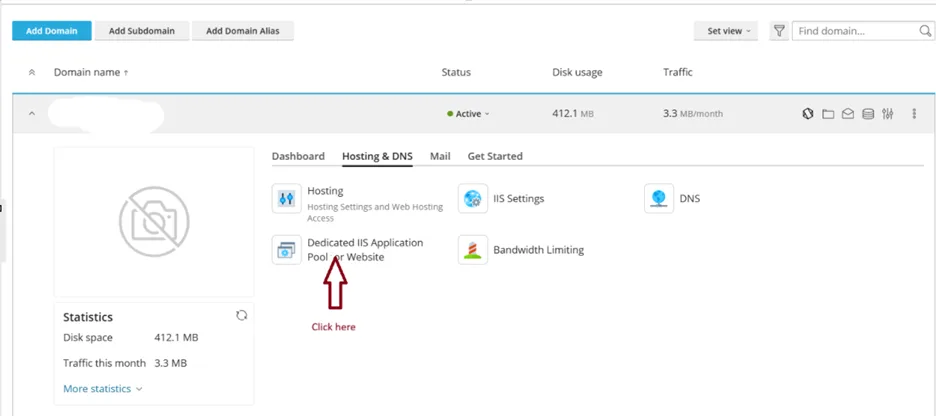
Then Restart the IIS application pool
Verification
Reload the website
Confirm the site loads without the 503 error
Verify services are running normally