
How to Change the PHP Version for a Domain from the Webuzo Panel
Summary
This article explains how to change the PHP version for a specific domain using the Webuzo control panel.
Applies To
Webuzo Control Panel
Shared Hosting
VPS Hosting
Symptoms
Users may encounter the following situations:
A website requires a different PHP version to function properly.
PHP compatibility errors appear on the website.
An application requires a newer or older PHP version.
Cause
The domain is configured to use an incompatible PHP version for the hosted application or website.
Resolution
Steps to Change the PHP Version for a Domain in Webuzo
Log in to your Webuzo panel.
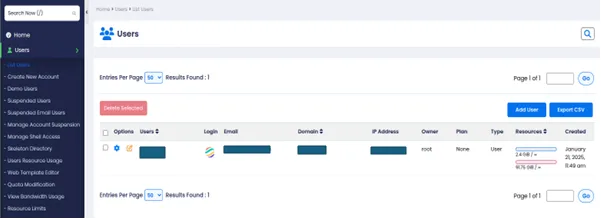
In the left-hand pane, click on List Users.
You will see the list of users. Click on the sphere icon next to the respective user.
Once logged in as the selected user, click on Configuration.
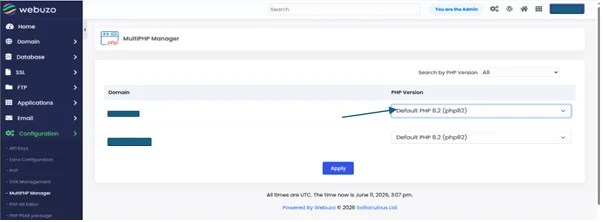
Under Configuration, click on MultiPHP Manager.
Select the domain for which you want to change the PHP version.
From the PHP version dropdown, select the required PHP version.
Click on Apply Changes.
Verification
Reopen MultiPHP Manager and verify the updated PHP version for the domain.
Create a PHP info file (phpinfo.php) or use an existing application dashboard to confirm the active PHP version.
Access the website and verify that it loads without any PHP-related errors.